úterý 17. srpna 2010

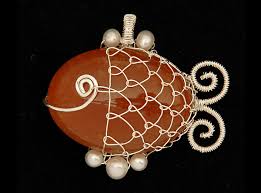
Fish from stone and wire

would you like to learn how to make a fish from the wire?
Here you can! Simple follow the steps on the pictures in following link:

INSTRUCTIONS HERE 
Instrukce jsou v českém jazyce (instruction in czech language)

 -------------------------------------------------------------
1 round stone
0,8 mm wire (about 50 cm long)
0,3 mm wire (about 65 cm long)
1 pliers
----------------------------------------------------------------

And some pictures for your inspiration:
Really nice done wire-fishes


First fish I have done step by step following the instruction pictures


Special thanks: http://www.myva.estranky.cz

neděle 15. srpna 2010

My jewellery sets


There are some pictures for your inspiration

agate
tree agate
amethyst

beads

aventurin

coral

aventurin

owl pendings


green opal
beads

středa 11. srpna 2010

Použití komponentů na výrobu náušnic 1/3 - GERMIA

Today I´ll show you how simple is to do beatitful earring with usage of castings. There are two different types of castings you can use. There are decorative castings in shape of teardrop, bead or leaf and there are castings in shape of animals like owl, butterfly or snail. You can find some other types like musical instruments and other stuff.

Here are some of the castings i have and i´ll show you how to work with them:


SPIRAL, LEAF, TEARDROP
are the first decorative castings. Using them is very simple, because you can put them only on the end of the earring. All you need is your imagination. Here are some of my ideas:


Click on the image
to   eNLARGe   it

pondělí 22. února 2010

Jak udělat korunku - GERMIA

I´ve obtained a job - to do the crown - something in the shape of the first picture, with the color of the second picture. It had to have a transparent background and look shiny.

I´ve started working in Inscape freeware vector program and I´ve done the basic shapes with the rectangle making tool, polygon making tool and circle making tool. Then I´ve chosen the tweak tool and made the shapes smooth and rounder. On the picture on the right side there are all the shapes I´ve used.


Next step was to join up the shapes with the same color and move this project to the program with the wider scale of colours. So I´ve opened Gimp freeware program and with all the select tools, masking tool and painting tools I´ve done some good projects. The winner is the picture on the right side.